Setup & Verify
A complete foundational setup of your Google Business Profile including verification
Why must businesses Setup a Google Business Profile today?
If your business isn’t on Google Business Profile in 2026, you’re missing customers who are actively searching—and now asking AI—for what you offer. Google and AI-driven search tools pull heavily from verified business profiles to answer queries like “best electrician near me” or “coffee shop open now.” If your profile isn’t complete and active, you’re far less likely to appear in those results. Meanwhile, competitors with optimized profiles show up first with their hours, location, reviews, and contact options—making it effortless for customers to choose them over you.
It also builds trust instantly. Reviews, fresh photos, and quick responses signal credibility not just to people, but to AI systems deciding which businesses to recommend. Since it’s free and directly drives calls, visits, and sales, a strong Google Business Profile isn’t optional anymore—it’s a core part of how customers (and AI) decide where to spend their money.
Challenges Facing Local Businesses
Are you missing out on more calls, leads, sales or visits because of the following?

The Competition Is Always Above You
If you are not actively updating, posting, responding to comments, and ensuring all the requirements that Google stipulates are necessary, your competitors will always appear way before you do, resulting in lost calls, visits and sales.

No Time To Keep Your GBP Up-To-Date
Incorrect phone numbers, outdated hours, or the wrong address don’t just confuse customers—they erode trust and push people toward competitors. Your GBP has to be maintained because if you don’t, Google simply drops you down the rankings. There is no other way to stay visible unless you spend tons of money on advertising.

Your Business Does Not Appear In Maps
If you don’t have a GBP, customers simply will not see you and they will go to your competition, simply because you do not appear in Google maps or Google searches with “near me” keywords, e.g. “Plumbers near me”.

Setting Up GBP Is Complicated!
It can feel overwhelming to set up your Google Business Profile because there are many moving parts—and staying competitive often becomes a near full-time effort—so outsourcing the upkeep and strategy is a practical choice.
Main Features of a GBP
Your GBP is the key that unlocks visibily and allows potential customer to not only find you, but also connect to your business, promote your business and validate your business. There is no other mechanism that gives you this online

Your Business Information
The essentials are your business name, address, phone number, website, and operating hours. This information should be consistent with what’s listed on your website and other online directories, as uniform details help Google confirm your business’s legitimacy and boost its visibility.

Categories & Services
Google allows you to choose a primary category along with additional categories that describe your business. You can also add specific services or products, and these choices affect which search results your profile shows up in.

Your Photos & Videos
Visual content helps make your profile much more engaging. You can add photos of your storefront, interior, staff, products, and completed projects. Listings with images tend to get far more direction requests and website clicks than those without.

Reviews & Ratings
Customer reviews are shown prominently on your profile, with the star rating often being the first thing people see. The total number of reviews, average score, and how recent they are all shape how your business is viewed by potential customers.

Ongoing Posts & Events
The Posts feature allows you to publish updates directly on your profile. You can share new products, promote events, highlight offers, or post general news. These posts show in your Knowledge Panel and can include images, text, and call-to-action buttons.

Messages & FAQ’s
The Q&A section lets users ask questions about your business, and you or others can respond. Adding common questions and answers in advance helps customers quickly find the information they need. Messaging also allows customers to contact you directly from your profile using a “Message” button, without needing to call.
The 3 Places GBP’s Appear
Your GBP is not only for Google Maps, but is the key to unlock Google Search and AI Search. It’s the foundation to dominating your local searches


The Local Pack
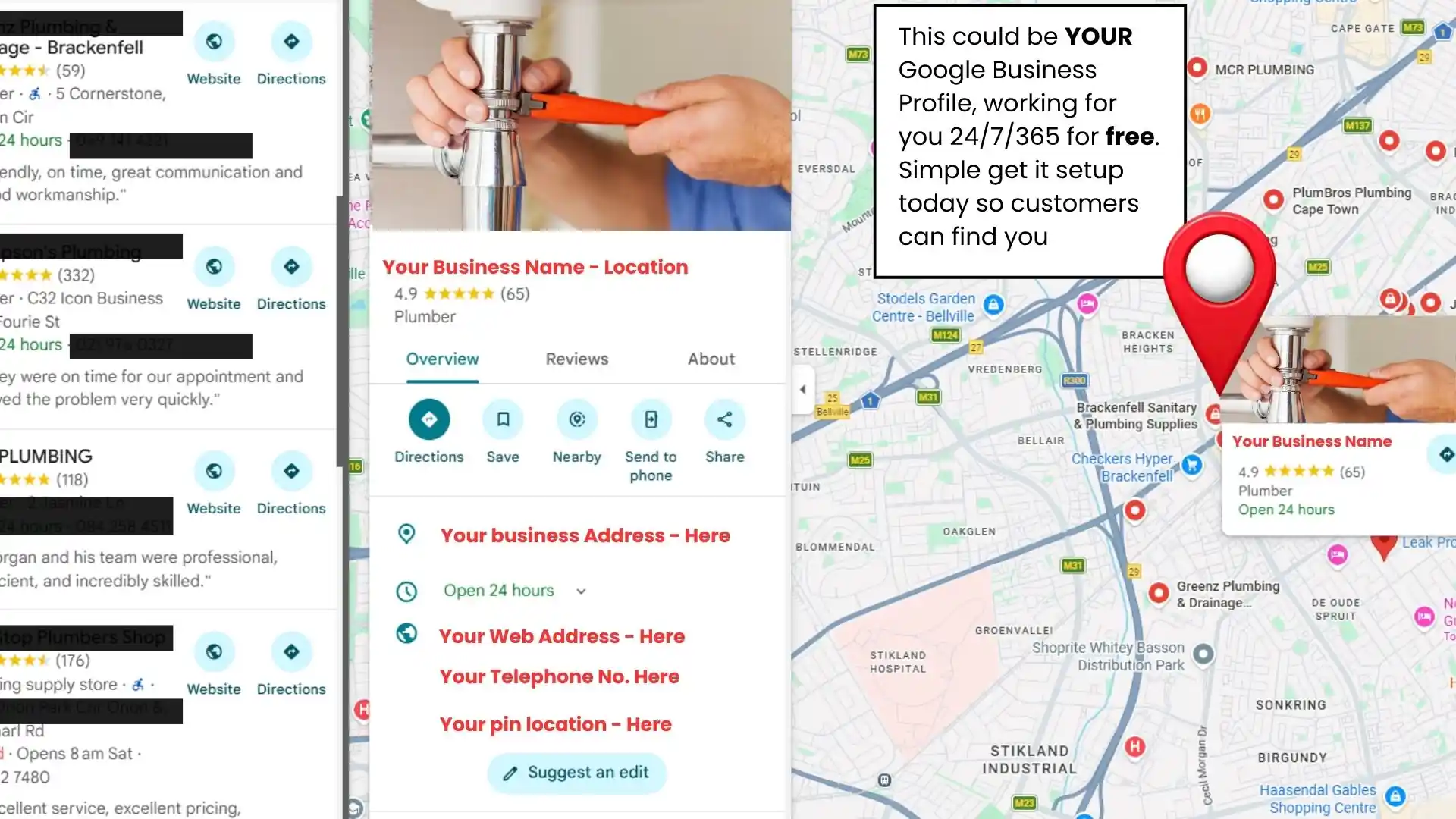
When someone searches for a local service, Google shows a map with three top listings—known as the Local Pack—pulled directly from Google Business Profile. These spots get most of the clicks and showcase key details like your name, rating, address, hours, and phone number.

Knowledge Panel
When someone searches your business by name, a Knowledge Panel appears—on the right on desktop or at the top on mobile—pulling all its details from your Google Business Profile. It gives a quick snapshot with photos, contact info, busy times, Q&A, and recent updates.
Frequently Asked Questions
This Could Be Your Business
Free Marketing
- Instant Visibility: Appear on Google Maps and local search results immediately.
- Built-in Trust: Show off reviews and photos that prove you’re the real deal.
- Free Marketing: Zero cost-per-click—just pure, organic traffic.
- Mobile Readiness: Let customers call you or get directions with one tap.
- Crucial Insights: See exactly how many people are looking for you and where they come from.